


My Car - Car Management
4.4101.00 Reviews
App Specs
- Version
- 5.1.311
- Updated On
- License
- Free
- Downloads
- 500,000+
- Developer
- KineApps Ltd
- Categories
- Auto & Vehicles
- Platform
- Android
Screenshots
 Analysis by AppCompare
I like a car-management app best when it takes small, easy-to-forget jobs and gives them a dependable home. My Car - Car Management is built around that practical idea: recording fuel, expenses, and maintenance so I can see the running story of a vehicle rather than rely on memory or scraps of paper. It is a free Auto & Vehicles app from KineApps Ltd, and its 4.3 average across around 5,300 ratings suggests plenty of drivers find the basic approach useful. My main advice is to treat it as a record-keeping tool: it can make your information easier to manage, but it still depends on you entering accurate details.
Who gets the most from a vehicle log
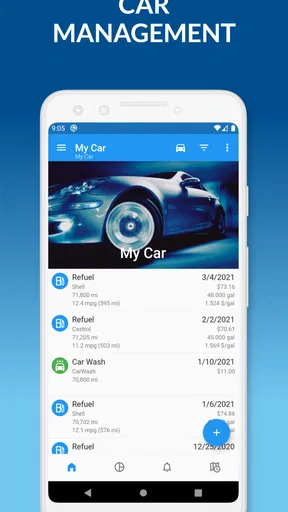
This is a natural fit if you own a car long enough for service intervals, recurring costs, and fuel habits to matter. A driver who wants to know when work was done, what it cost, and how fuel spending changes over time can build a useful history here. It also suits a household with several vehicles, since keeping separate records is less messy than mixing receipts and reminders in one notebook.
I would be more cautious if you expect automatic tracking to do the work for you. The value of maintenance and expense records comes from entering them consistently; if you dislike logging purchases or service visits, a simpler calendar reminder may be easier to maintain. Drivers who already use a comprehensive bookkeeping or fleet system may also find a dedicated car log redundant. The best reason to choose this app is a desire to keep vehicle details together, not a need for a replacement for a mechanic, insurer, or financial ledger.
How it fits into everyday driving
One useful routine is to make an entry while a receipt is still in hand. After filling up, recording the visit promptly gives the fuel log a better chance of reflecting real use than trying to reconstruct a month from bank statements. The same habit works after a repair: note what was done and what it cost, then the history can help when planning the next service or comparing expenses across vehicles.
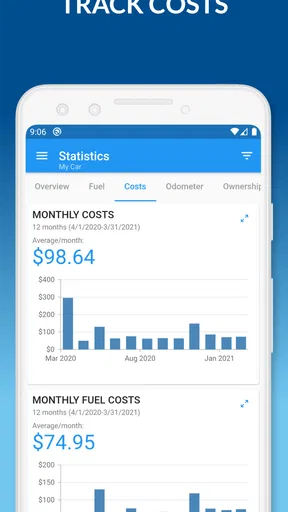
For example, after a long commute-heavy month, I would look at the fuel entries alongside the expense record before deciding whether a change in spending came from more driving, a repair, or a shift in fuel use. That is a modest but practical benefit: the app can put related information near each other, while the driver supplies the context. It is not a substitute for checking an unusual mechanical symptom or calculating a full household budget, but it can make those conversations less dependent on guesswork.
What the numbers can and cannot tell you
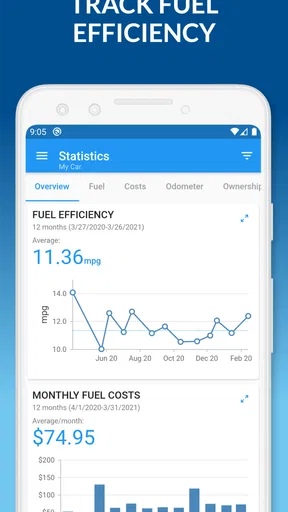
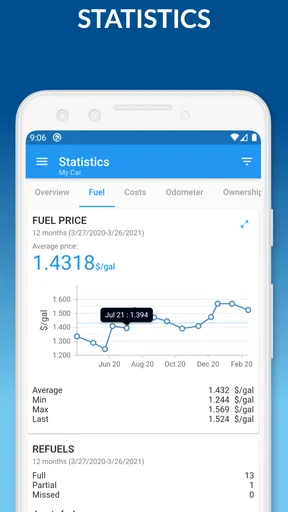
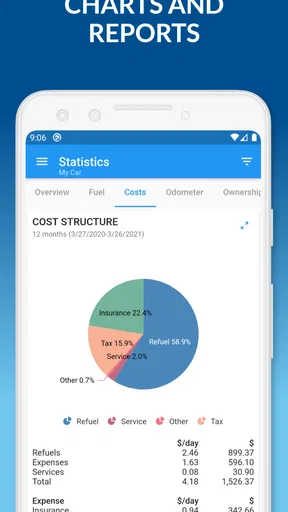
Fuel charts are most useful when entries are consistent. If I forget a fill-up or enter an amount incorrectly, a trend can look more meaningful than it really is. I would use the reports to spot broad patterns rather than treat every change as proof that the car has developed a problem. Driving conditions, routes, weather, and load can all affect consumption, and a log alone cannot separate those causes.
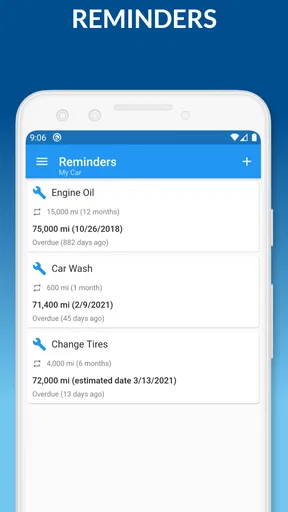
That same discipline applies to maintenance reminders. A reminder is a prompt to check the vehicle’s schedule and records, not a diagnosis or an instruction to replace a part automatically. I would keep invoices and follow the manufacturer’s service guidance, then use the app as a convenient index of what has happened. This distinction matters for anyone deciding whether the app can replace a service book: it can help organize a history, but good source records and sensible maintenance decisions remain the driver’s responsibility.
Worth Reading Before You Choose

EA SPORTS FC Mobile 26 Is a Bigger Football Game, but It Takes Time

Flipboard Shows What News Apps Must Do Beyond the Feed

Switching to Android Auto Means Rethinking Your Driving Routine

Google Calendar Makes a Crowded Week Easier to Manage

Ludo King Makes the Most of the Minutes Between Plans

Baby Panda World Brings Quick Play to Modern Phones, but Its Game Library Feels Busy
Current version and ongoing expectations
The current version is 5.0.300, and the app has been available since September 23, 2019. That gives it an established presence rather than the feel of a brand-new experiment. The important question for an existing user is less whether the version number looks recent and more whether the features they depend on continue to suit their routine. I would check the current app experience before moving a long vehicle history into any new workflow, especially if that history is important for resale or household records.
It is rated for Everyone and has passed 500,000 installs, so it is aimed at ordinary drivers rather than a specialist workshop audience. The core appeal remains straightforward organization. I would not assume an update has changed a particular screen or added a feature unless I can see that change in the app itself; version information is useful context, not a promise about what will come next.
There is also a practical cost distinction to keep in mind. The app is free to install, while in-app purchases range from $0.99 to $109.99 per item. I would start by deciding which parts of the basic vehicle log I actually use, then check the purchase details in the app before paying for anything. That avoids spending on extras just because they are available, and makes it easier to judge whether a paid option solves a real problem in my routine.
Getting Started with My Car - Car Management
First things first, downloading and setting up the app was a walk in the park. Available on both Android and iOS, I found it in the App Store, hit download, and was ready to roll in no time. Setting up your car’s profile is pretty straightforward. You just input basic details like make, model, year, and VIN. The user interface is intuitive, with a clean design that makes navigation a breeze.
Features That Stand Out
One of the first things I appreciated was the comprehensive maintenance tracking feature. You can log oil changes, tire rotations, and even brake checks. The app sends timely reminders for upcoming services, which, let’s be honest, is a lifesaver for those of us with busy schedules.
Another nifty feature is the fuel log. You can keep track of your refueling habits, monitor fuel efficiency, and even get insights into your spending. It’s like having a personal accountant for your fuel expenses. And if you’re a data nerd like me, you’ll love the detailed reports and charts showing your car's consumption trends.
Insurance and Expense Management
The app also offers a section for insurance management. You can store all your policy details in one place, which is super handy. I no longer have to dig through old emails or paperwork to find my insurance info. Plus, there’s a feature to track all car-related expenses, from repairs to tolls, helping you keep an eye on where your money is going.
Usability and Performance
In terms of performance, My Car - Car Management runs smoothly without any noticeable lags. The app is regularly updated, which is a good sign of ongoing support from the developers. I found that syncing data between multiple devices was seamless, so you can access your car’s info whether you’re on your phone or tablet.
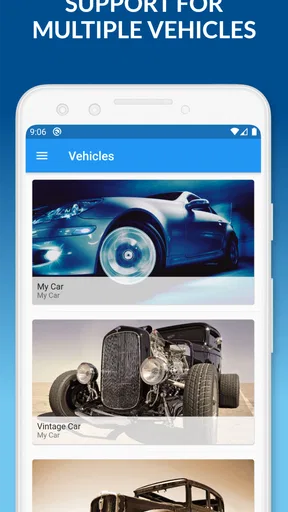
The app’s usability gets a big thumbs up from me. Everything is laid out logically, and finding what you need is never a hassle. The app also supports multiple vehicles, which is perfect for those managing more than one car.
Final Thoughts
So, is My Car - Car Management worth downloading? In my opinion, yes! It’s a user-friendly solution for anyone looking to keep their vehicle’s details organized. While it might not have every bell and whistle under the sun, it covers all the essentials and does so with style. Whether you’re a car enthusiast or just someone who wants to stay on top of vehicle maintenance, this app is definitely worth a try.
Ready to give it a spin? You can download it from the App Store or Google Play and start managing your car like a pro. Happy driving!
Pros
- User-friendly interface for easy navigation.
- Comprehensive tracking of maintenance schedules.
- Fuel consumption logging with detailed insights.
- Customizable reminders for car services.
- Supports multiple vehicles with ease.
Cons
- Limited integration with third-party services.
- Occasional syncing issues with cloud storage.
- No option for tracking insurance policies.
- Ads can be intrusive in the free version.
- Lacks advanced analytics for car performance.
FAQs for My Car - Car Management
What features does My Car - Car Management offer?
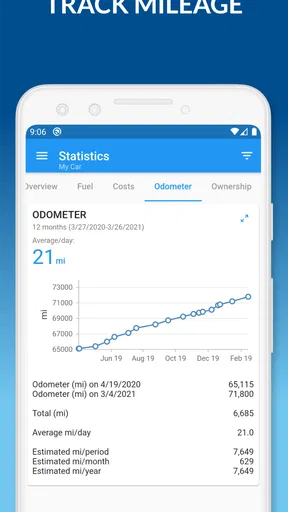
My Car - Car Management provides a comprehensive suite of features aimed at simplifying vehicle maintenance. Users can track fuel consumption, set reminders for service appointments, log expenses, and monitor mileage. Additionally, the app offers customizable alerts for insurance renewals and provides detailed reports to help analyze vehicle performance.
Is My Car - Car Management available for both Android and iOS devices?
Yes, My Car - Car Management is available for both Android and iOS platforms. Users can download the app from the Google Play Store for Android devices and the Apple App Store for iOS devices, ensuring a seamless experience across different operating systems.
How user-friendly is the My Car - Car Management app?
The app is designed with an intuitive interface, making it user-friendly even for those who are not tech-savvy. It offers easy navigation and clear instructions, allowing users to quickly input data and retrieve vehicle information without hassle. Its straightforward design ensures that managing car details is both efficient and stress-free.
Does My Car - Car Management require a subscription?
My Car - Car Management offers both free and premium versions. The free version provides basic features, while the premium subscription unlocks additional functionalities such as advanced reporting and personalized alerts. Users can choose a plan that best suits their needs, with flexible payment options available for the premium version.
Can My Car - Car Management handle multiple vehicles?
Yes, the app is capable of managing multiple vehicles simultaneously. Users can easily add different cars to their profile and track individual details for each vehicle. This feature is particularly beneficial for families or businesses with more than one car, ensuring organized and efficient management.


